Product usage limits
The limits below are the defaults the application falls back to. Your account can be granted different values, and the application always validates a report against the ones that apply to you: the Report limits section of the creation page shows the region count and region area allowance, and the Dates and Times section headers show the date and time range allowance as a counter.
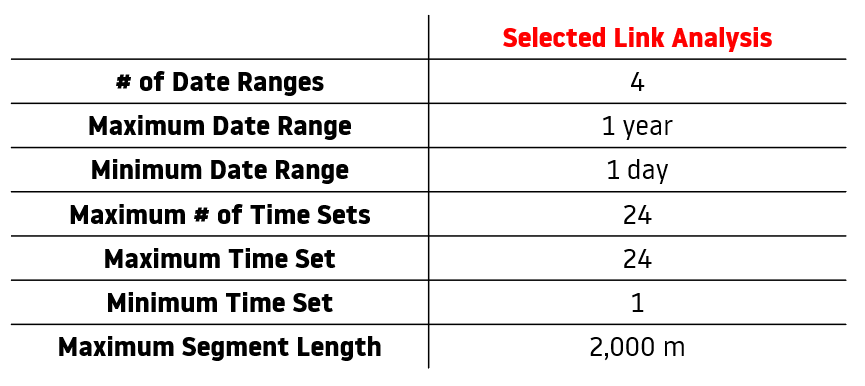
Origin/Destination Analysis Default Usage Limits
| Limit | Default value |
|---|---|
| Regions per report | 600 |
| Regions per report with Origin - Destination only enabled | 1,800 |
| Total region area per report | 3,000 km² |
| Date ranges per report | 4 |
| Time ranges per report | 24 |
| Region count above which Trip statistics cannot be enabled | 600 |
Selected Link Analysis Default Usage Limits
| Limit | Default value |
|---|---|
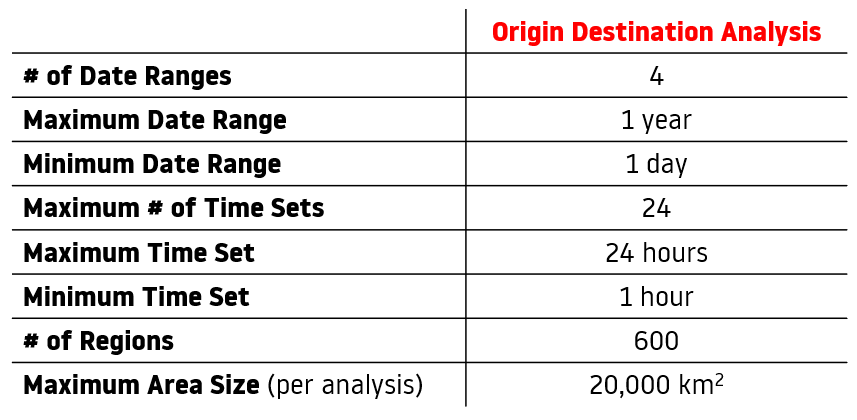
| Total length of the selected road segments | 2,000 m |
| Radius around a selected link | 5 km to 50 km, 10 km by default |
| Area of the analyzed polygon | 3 km² |
| Radius around an analyzed polygon | 5 km to 10 km |
| Date ranges per report | 4 |
| Time ranges per report | 24 |