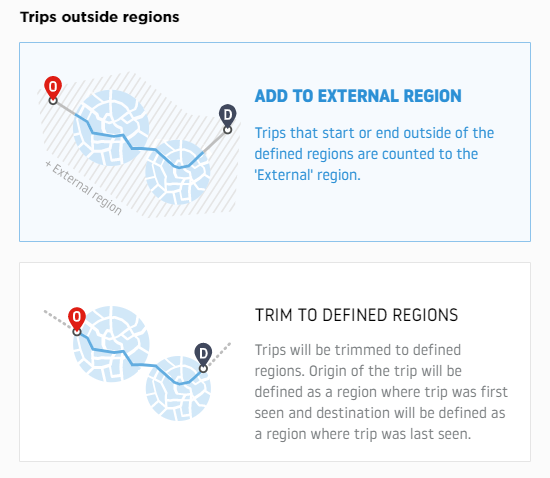
Trips outside regions
Not every trip that matters to an analysis starts and ends inside the regions you defined. Some trips only pass through them, and some start or end just outside their boundary. How those trips are counted is one of the differences between version 1 and version 2.
What changed in version 2
In version 1 you had to commit to one of two behaviours while creating the report, and the choice was baked into the result.
Version 2 removes that decision from report creation. The selector is not part of the version 2 creation page, and the handling of outside-region trips moved to the results instead.
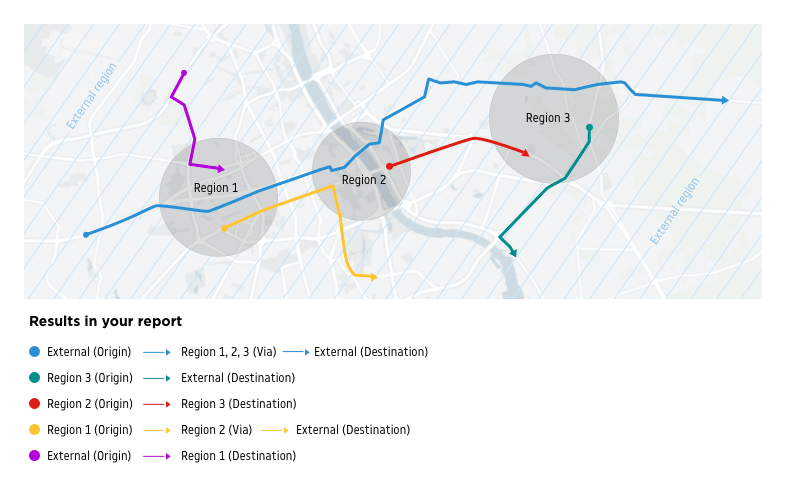
Because no choice is made up front, every version 2 Flow Matrix report keeps the External region. Trips that start or end outside your regions are counted into a separate External region rather than being folded into the region they happened to travel through, and that region is available in the results as an extra row and column of the matrix and as an endpoint in the flows.
The two behaviours
- Add to external region: trips with a start or end point outside your defined regions are counted into a separate External region, rather than being assigned to the region they traveled through.
Only the trips that started or ended exactly in the regions you defined are added to those regions. This is the behaviour every version 2 report is calculated with.
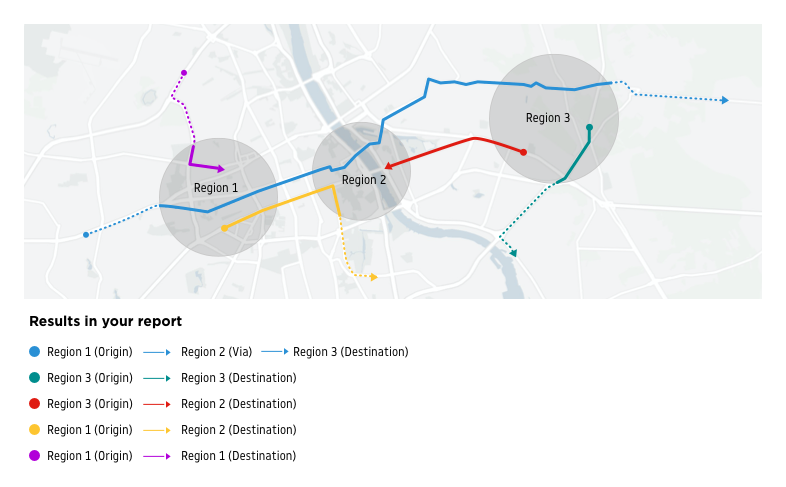
- Trim to defined regions: trips that started or ended outside of your regions but traveled through them are attributed to the region they were first and last seen in. No additional External region is created, as the trips are trimmed to the regions you have defined.
This was the default in version 1 and it is still what a version 1 report does.