Intermediate Traffic Evaluation API - Traffic Incidents
Purpose
This endpoint is part of the self-service Intermediate Traffic Evaluation API, intended for exploring TomTom traffic incident data ahead of a production integration with the Intermediate Traffic API.
The TomTom Traffic Incidents - Intermediate Service - DATEX II (hereafter called 'Service') is based on DATEX II v1.0. DATEX II is a standard for information exchange between traffic control centers, service providers, and application developers.
The Service provides the latest real-time information about traffic incidents, their causes and impacts on travelers. Typical traffic incidents include accidents, road construction projects, traffic jams, road closures, and any other road-related situation that could potentially cause a delay.
In this document, we discuss how to access the Service and the features that are included.
Important
TomTom only supports the Intermediate Service with the use of the TomTom customized DATEX II schema, available for download from our website (linked previously and later in this document). Using the Service with the standard DATEX II schema will disable the functionality that is included with the Service. Therefore, the standard DATEX II schema is not supported.
Features
TomTom provides customers information on traffic congestion and other roadwork-related traffic events.
Each traffic incident is represented in a DATEX II event, and we add an Alert-C event code with the same meaning. This Alert-C event code allows the user to customize the content at their own discretion.
Detailed information about the available features and their representation in DATEX II can be found in the section Available features.
Request data
How do you make a request?
For ease of viewing and identification:
- Constants and parameters enclosed in curly brackets { } must be replaced with their values.
- Please see the following Request parameters and Request headers sections with the required and optional parameters tables for their values.
The generic request format is as follows:
https://api.tomtom.com/maps/orbis/intermediate-traffic/incidents/{cityName}/content.xml
The following shows an example cURL request with the required headers:
1curl --request GET --compressed \2 --url "https://api.tomtom.com/maps/orbis/intermediate-traffic/incidents/{cityName}/content.xml" \3 --header "TomTom-Api-Key: {yourTomTomApiKey}" \4 --header "TomTom-Api-Version: 1" \5 --header "Accept-Encoding: gzip"
Request parameters
The following table provides a detailed explanation of the available fields that were previously shown in the How do you make a request? section.
| Required parameters | Description |
|---|---|
required | The name of the city you are requesting traffic incident data for. You can find the list of available cities in the Available cities section. The value is case-insensitive. Example: |
Request headers
The following table provides a detailed explanation of the available headers that were previously shown in the How do you make a request? section.
| Headers | Description |
|---|---|
required | Authentication key for access to the API. If you don't have an API key yet, see the Getting started section. Value: Your TomTom API key. |
required | Version of the API to use.
Currently, the only supported version is Value: |
required | Specifies the encoding algorithms that are acceptable for the response.
The value must include Example: |
optional | Since incident feeds can be very large, TomTom
recommends optimizing information transmission
as much as possible by using the standard HTTP header
If-Modified-Since
with the last value of Example: |
Response data
Response codes
| Response code | Description |
|---|---|
| 200 OK | Indicates that the request has succeeded. The response body will contain the requested data. |
| 304 Not Modified | Only used if the |
| 401 Unauthorized | Indicates that the request requires user authentication information. The client MAY repeat the request with a suitable Authorization header field. |
| 406 Not Acceptable | The server doesn't find any content that conforms with the |
Response example
This is a response you receive after a request is made. If you make the following request:
https://api.tomtom.com/maps/orbis/intermediate-traffic/incidents/amsterdam/content.xml
You can expect the following response:
1<?xml version="1.0" encoding="UTF-8"?>2<d2LogicalModel xmlns="http://datex2.eu/schema/1_0/1_0" modelBaseVersion="1.0">3 <exchange>4 <supplierIdentification>5 <country>nl</country>6 <nationalIdentifier>TomTom Traffic Service</nationalIdentifier>7 </supplierIdentification>8 </exchange>9 <payloadPublication xmlns:xsi="http://www.w3.org/2001/XMLSchema-instance" xsi:type="SituationPublication" lang="en">10 <publicationTime>2026-03-06T07:52:00Z</publicationTime>11 <publicationCreator>12 <country>other</country>13 <nationalIdentifier>e28bc9d4-4e05-4918-b662-256202959956</nationalIdentifier>14 </publicationCreator>15 <payloadPublicationExtension>16 <mapVersion>eur2026.01.140</mapVersion>17 </payloadPublicationExtension>18 <situation id="TTI-e28bc9d4-4e05-4918-b662-256202959956-TTL36284206680019000_1">19 <headerInformation>20 <confidentiality>internalUse</confidentiality>21 <informationStatus>real</informationStatus>22 <urgency>urgent</urgency>23 </headerInformation>24 <situationRecord xmlns:xsi="http://www.w3.org/2001/XMLSchema-instance" xsi:type="AbnormalTraffic" id="TTI-e28bc9d4-4e05-4918-b662-256202959956-TTL36284206680019000_1-1">25 <situationRecordCreationTime>2026-03-06T07:52:00Z</situationRecordCreationTime>26 <situationRecordVersion>1</situationRecordVersion>27 <situationRecordVersionTime>2026-03-06T07:52:00Z</situationRecordVersionTime>28 <situationRecordFirstSupplierVersionTime>2026-03-06T07:52:00Z</situationRecordFirstSupplierVersionTime>29 <probabilityOfOccurrence>certain</probabilityOfOccurrence>30 <validity>31 <validityStatus>definedByValidityTimeSpec</validityStatus>32 <validityTimeSpecification>33 <overallStartTime>2026-03-06T07:52:00Z</overallStartTime>34 <overallEndTime>2026-03-06T08:12:00Z</overallEndTime>35 </validityTimeSpecification>36 </validity>37 <impact>38 <delays>39 <delayTimeValue>24.0</delayTimeValue>40 </delays>41 </impact>42 <groupOfLocations>43 <locationContainedInGroup xsi:type="Linear">44 <locationExtension>45 <openlr>46 <binary version="3">CwN0RiU3qxpwBf/y/usaYG4f</binary>47 </openlr>48 <fromNodeName>49 <name>Burgerweeshuispad (A10)</name>50 </fromNodeName>51 <toNodeName>52 <name>De Boelelaan</name>53 </toNodeName>54 <roadNumber>s108</roadNumber>55 <idlr method="OSM">F47454649#100</idlr>56 <idlr method="GERS">F3224dbf0-a76e-4a61-a351-cdc7c2564ca8#133</idlr>57 </locationExtension>58 </locationContainedInGroup>59 </groupOfLocations>60 <situationRecordExtension>61 <alertCEventCode>108</alertCEventCode>62 <conditionalOffset>72</conditionalOffset>63 </situationRecordExtension>64 <abnormalTrafficType>queueingTraffic</abnormalTrafficType>65 <abnormalTrafficExtension>66 <averageSpeed>7.2</averageSpeed>67 </abnormalTrafficExtension>68 </situationRecord>69 </situation>7071[...]7273 </payloadPublication>74</d2LogicalModel>
Response - DATEX II payload specification (analysis of the received output)
The payload in the output is formatted as DATEX II, which is a European standard for the exchange of Traffic and Travel Information. TomTom supports version 1. Recommended documents are:
- DATEX II v1.0 User Guide version 1.0 ( DATEXIIv1.0-UserGuide_v1.0.pdf )
- DATEX II v1.0 Software Developers Guide version 1.0 ( DATEXIIv1.0-DevGuide_v1.0.pdf )
- DATEX II v1.0 Exchange Platform Specific Model version 1.0 ( DATEXIIv1.0-ExchangePSM_v1.0.pdf )
- A browsable DATEX II version 1.0 data dictionary ( DATEXIIv1.0-DataDictionnary_v1.0.zip )
The Elaborated Data Publication, used by TomTom, is described in more detail in section 4.11 of the DATEX II User Guide version 1.0.
Important: XSD schema
TomTom extended the data model with additional fields; the full XSD schema including extensions can be downloaded by clicking this Level B extension. It is a "Level B" extension of the standard XML schema: DATEXIISchema_1_0_1_0.xsd. Such an extension is interoperable with the "Level A" data model (see section 2.2.3 in the DATEX II User Guide version 1.0 for more information).
How the data is organized
Situation publication
The traffic information is provided as a SituationPublication. A SituationPublication is the
snapshot of the latest traffic data. A SituationPublication can contain several different
situations.
The service does not support a delta mechanism. Therefore, incremental updates are not possible.
Situation
A situation represents a traffic or travel incident comprising one or more traffic or travel
circumstances. These are linked by one or more causal relationships and apply to related locations.
Each traffic or travel circumstance is represented by a SituationRecord.
Situation record
A SituationRecord is one element of a situation. It is characterized by values at a given time,
defining one version of this element. When these values change, a new version is created. One
SituationRecord can be:
- a road or traffic related event (traffic element)
- an operator action
- a piece of information that is based on a non-road event
and can contain:
- an advisory
- details that impact the estimated time of arrival
Unique identifier
Each Situation has a unique identifier. Additionally, every SituationRecord also has a unique
identifier. This identifier is established when the Situation or SituationRecord is first created
in the DATEX II system database. As long as the situation exists, this identifier will always be
present within the system. The unique identifier has a fixed prefix "TT", followed by a string. No
further assumptions should be made about the identifier.
The identifier is unique across all supported countries.
Impact
If the current delay is available for a SituationRecord, the delayTimeValue is provided in the
Impact. If there is information about closed lanes, because of an accident or other incident, it can
be populated in ImpactDetails.
Related situation records
In some cases, there are multiple SituationRecords that are related to each other. For instance,
there can be a traffic jam that is caused by an accident. If the locations of these
SituationRecords overlap or are connected AND they occur in the same direction, then the
SituationRecords are contained in the same Situation. In that case, a single Situation contains
more than one SituationRecord.
When a Situation contains multiple SituationRecords, the first SituationRecord
represents the main event, while any subsequent records represent additional event
information or causal information.
Sometimes, it is possible that two SituationRecords are related to each other, but do not overlap.
For instance, one SituationRecord contains a diversion advice, located at a highway intersection.
Since the road is blocked farther along the segment, that is described in a different
SituationRecord. In that case, the SituationPublication does not contain a reference from one
SituationRecord to the other.
For the first example, consider combining the information from the SituationRecords in your end
application to let the end-user know there is a delay due to an accident. In the second example,
there is a diversion due to a road closure.
Location referencing
OpenLR
OpenLR (see http://www.openlr.org) is a dynamic location referencing method that allows referencing of any road on the complete digital map. Because of its flexibility, it is possible to describe traffic events on high-level and lower-level road classes.
The following geographical representations that are supported:
- OpenLR location referencing,
- Identifier-based location referencing using OSM way IDs for a location referencing specific for OSM maps, or
- Identifier-based location referencing using GERS IDs for a location referencing specific for the Orbis map.
The Service uses binary format version 3, as described in the OpenLR whitepaper. The whitepaper, software developer kit, and open source reference implementations are available for download from the OpenLR website. TomTom offers support for third parties to implement and test their own implementations.
Every SituationRecord contains a groupOfLocations, which describes the involved location.
The Location is defined in section 4.16 of the DATEX II User Guide.
1<groupOfLocations>2 <locationContainedInGroup xsi:type="Linear">3 <locationExtension>4 <openlr>5 <binary version="3">CwkmCSJZIRtmJQiDBE4bEg==</binary>6 </openlr>7 </locationExtension>8 </locationContainedInGroup>9</groupOfLocations>
Identifier-based location referencing using OSM way IDs
Identifier-based location referencing using OSM way IDs (hereafter called 'IDLR-OSM') is offered as an alternative method of location referencing besides OpenLR.
The IDLR-OSM is identified by the value OSM for the attribute method.
The ID list can contain a list of OSM way IDs in the format
[D + wayid + [# + start_offset] + [# + end_offset]] ... where:
D: The OSM way ID direction (required). It can take two different values:F: Forward direction.R: Reverse / Backwards direction.
wayid: The OSM way ID. (required)#: The offset separator. (required if offsets are used)start_offset: The start-offset in meters on the OSM way ID. (optional)end_offset: The end-offset in meters on the OSM way ID. (optional) When the end-offset is provided, a start-offset needs to be provided, too.
The following example shows a locationExtension element with an IDLR-OSM in the idlr element
indicated by the attribute method="OSM" that is composed of three OSM way IDs.
All IDs use the forward direction, the first ID uses a start-offset of 300 meters,
the second doesn't have offsets, and the third uses an end-offset of 203 meters. Since the end-offset is the
second offset in the list of offsets, it always requires an explicit mention of the start-offset
with 0 meters if the ID does not use a start-offset. The affected location is the concatenation of all IDs
minus the offset information.
1<situation [...]>2 <situationRecord [...]>3 [...]4 <groupOfLocations>5 <locationContainedInGroup xsi:type="Linear">6 <locationExtension>7 <openlr>8 <binary version="3">[...]</binary>9 </openlr>10 <idlr method="OSM">"F491249694#300 F568042661 F116413004#0#203"</idlr>11 </locationExtension>12 </locationContainedInGroup>13 </groupOfLocations>14 [...]15 </situationRecord>16</situation>
Identifier-based location referencing using GERS IDs
Identifier-based location referencing using Global Entity Reference System (hereafter called 'IDLR-GERS') is offered as an alternative method of location referencing besides OpenLR and IDLR-OSM.
The IDLR-GERS is identified by the value GERS for the attribute method.
The ID list can contain a list of GERS IDs in the format
[D + GERS_ID + [# + start_offset] + [# + end_offset]] ... where:
D: The GERS ID direction (required). It can take two different values:F: Forward direction.R: Reverse / Backwards direction.
GERS_ID: The GERS ID. (required)#: The offset separator. (required if offsets are used)start_offset: The start-offset in meters on the GERS ID (optional)end_offset: The end-offset in meters on the GERS ID (optional). When the end-offset is provided, a start-offset needs to be provided, too.
The following example shows a locationExtension element with an IDLR-GERS in the idlr element
indicated by the attribute method="GERS" that is composed of two GERS IDs.
Both IDs use the forward direction, the first ID uses a start-offset of 561 meters, and the second uses an end-offset.
Since the end-offset is the second offset in the list of offsets, it always requires an explicit mention of the start-offset
with 0 meters if the ID does not use a start-offset. The affected location is the concatenation of all IDs
minus the offset information.
1<situation [...]>2 <situationRecord [...]>3 [...]4 <groupOfLocations>5 <locationContainedInGroup xsi:type="Linear">6 <locationExtension>7 <openlr>8 <binary version="3">[...]</binary>9 </openlr>10 <idlr method="GERS">F0871f428-80ff-ffff-047d-7fb9bb3ed230#561 F0881f428-80bf-ffff-047f-c80b78407632#0#298</idlr>11 </locationExtension>12 </locationContainedInGroup>13 </groupOfLocations>14 [...]15 </situationRecord>16</situation>
For more information on how to use GERS IDs, please visit the Overture Maps website.
Available features
The DATEX II data model has been extended to allow additional parameters. Some of these extensions are needed for the standard feed information and are explained in the following sections.
Alert-C event codes
| Field |
|
|---|---|
| Description | The Alert-C event code describing the When more than one code is present, the first Refer to ISO TS 14819-2 at https://www.iso.org for Alert-C codes and conventions. |
1<situationRecord [...]>2 [...]3 <situationRecordExtension>4 <alertCEventCode>115</alertCEventCode>5 </situationRecordExtension>6</situationRecord>
Refer to ISO TS 14819-2 at https://www.iso.org for Alert-C codes and conventions.
Average speed for jams
| Field |
|
|---|---|
| Description | The average speed for congestion events, in km/h. |
1<situationRecord xsi:type="AbnormalTraffic" [...]>2 [...]3 <abnormalTrafficExtension>4 <averageSpeed>18.0</averageSpeed>5 </abnormalTrafficExtension>6</situationRecord>
Delay for jams
| Field |
|
|---|---|
| Description | The |
1<situationRecord xsi:type="AbnormalTraffic" [...]>2 [...]3 <impact>4 <delays>5 <delayTimeValue>64.0</delayTimeValue>6 </delays>7 </impact>8 [...]9</situationRecord>
Future incidents
| Fields |
|
|---|---|
| Description | Includes incidents whose start time is in the
future (for example, planned roadworks, or road closures).
The field is expressed as a UTC time (e.g., 14:22 UTC).
The start time of future incidents is after the publication time.
The |
1<?xml version="1.0" ?>2<d2LogicalModel3 xmlns="http://datex2.eu/schema/1_0/1_0"4 modelBaseVersion="1.0">5 [...]6 <payloadPublication7 xmlns:xsi="http://www.w3.org/2001/XMLSchema-instance"8 xsi:type="SituationPublication" lang="en">9 <!-- time when snapshot was created -->10 <publicationTime>2023-10-10T00:00:00Z</publicationTime>11 <situation [...]>12 <situationRecord [...]>13 [...]14 <validity>15 <validityStatus>suspended</validityStatus>16 <validityTimeSpecification>17 <!-- start time of the incident -->18 <overallStartTime>2023-10-15T00:00:00Z</overallStartTime>19 </validityTimeSpecification>20 </validity>21 [...]22 </situationRecord>23 </situation>24 </payloadPublication>25<d2LogicalModel/>
HOV jams
| Field |
|
|---|---|
| Description | Provides the user with high-occupancy vehicle
(HOV) jams information. This feature is only available in combination
with the location referencing method OpenLR.
The |
1<situationRecord [...]>2 [...]3 <groupOfLocations>4 <locationContainedInGroup xsi:type="Linear">5 <locationExtension>6 <openlr>7 <binary version="3">KwSSoyRHmAEVCP18/zsBRds=</binary>8 </openlr>9 </locationExtension>10 <supplementaryPositionalDescription>11 <lanes>carPoolLane</lanes>12 </supplementaryPositionalDescription>13 </locationContainedInGroup>14 </groupOfLocations>15 [...]16</situationRecord>
Incident end time
| Field |
|
|---|---|
| Description | This option predicts the expected ending time for the traffic incident such as the expected end time of a jam or a closure. This field is expressed as a UTC time (e.g., 14:22 UTC). These end times may be created by TomTom or originate from local road authorities (for journalistic events). |
1<situationRecord [...]>2 [...]3 <validity>4 <validityStatus>definedByValidityTimeSpec</validityStatus>5 <validityTimeSpecification>6 <overallStartTime>2023-10-10T08:00:00Z</overallStartTime>7 <overallEndTime>2023-11-13T00:00:00Z</overallEndTime>8 </validityTimeSpecification>9 </validity>10 [...]11</situationRecord>
Incident node name
| Fields |
|
|---|---|
| Description | Provides node names for cross-streets at the beginning and end of the road segment. |
1<situationRecord [...]>2 [...]3 <groupOfLocations>4 <locationContainedInGroup xsi:type="Linear">5 <locationExtension>6 [...]7 <fromNodeName>8 <name>Globe St/S Main St (Broadway St/MA-138)</name>9 </fromNodeName>10 <toNodeName>11 <name>I-195 (Broadway St/MA-138)</name>12 </toNodeName>13 [...]14 </locationExtension>15 </locationContainedInGroup>16 </groupOfLocations>17 [...]18</situationRecord>
Jam tendency
| Field |
|
|---|---|
| Description | This feature indicates whether a jam is improving,
remaining stable, or becoming worse. The feature is
supported for the situation record type
|
1<situationRecord [...] xsi:type="AbnormalTraffic" [...]>2 [...]3 <trafficTrendType>trafficBuildingUp</trafficTrendType>4 [...]5</situationRecord>
Language-specific texts
| Field |
|
|---|---|
| Description | A |
1<situationRecord [...]>2 [...]3 <generalPublicComment>4 <comment>5 <value lang="en">The pass is free in both directions.</value>6 <comment>7 </generalPublicComment>8</situationRecord>
Map version
| Field |
|
|---|---|
| Description | Provides the names and versions of the maps that were used to create the content. |
1<?xml version="1.0" encoding="UTF-8"?>2<d2LogicalModel xmlns="http://datex2.eu/schema/1_0/1_0" modelBaseVersion="1.0">3 [...]4 <payloadPublication5 xmlns:xsi="http://www.w3.org/2001/XMLSchema-instance"6 xsi:type="SituationPublication" lang="en">7 [...]8 <payloadPublicationExtension>9 <mapVersion>nam2023.06.060</mapVersion>10 </payloadPublicationExtension>11 <!-- list of situation elements follows -->12 [...]13 </payloadPublication>14</d2LogicalModel>
Probability of occurrence
| Field |
|
|---|---|
| Description | The semantics of this field are deprecated and will be removed in the future. Do not use. The reason why this attribute is used at all is that in DATEX II v1.0 it is a mandatory field. |
1<situationRecord [...]>2 [...]3 <probabilityOfOccurrence>probable</probabilityOfOccurrence>4 [...]5</situationRecord>
Road number
| Field |
|
|---|---|
| Description | Provides the road identifier or road number of the affected location. |
1<situationRecord [...]>2 [...]3 <groupOfLocations>4 <locationContainedInGroup xsi:type="Linear">5 <locationExtension>6 [...]7 <roadNumber>A3</roadNumber>8 </locationExtension>9 </locationContainedInGroup>10 </groupOfLocations>11 [...]12</situationRecord>
Turn-dependent jams
| Field |
|
|---|---|
| Description | Selecting this option provides the user with turn-dependent jams information. The user receives messages when a portion of the jam is projected to affect travel only if following in the direction of the jam. Common use cases include: congestion on exit ramps, entry ramps, turn-lanes, and so on. To find the actual affected location, the (conditional) offset must be applied from the end of the location. 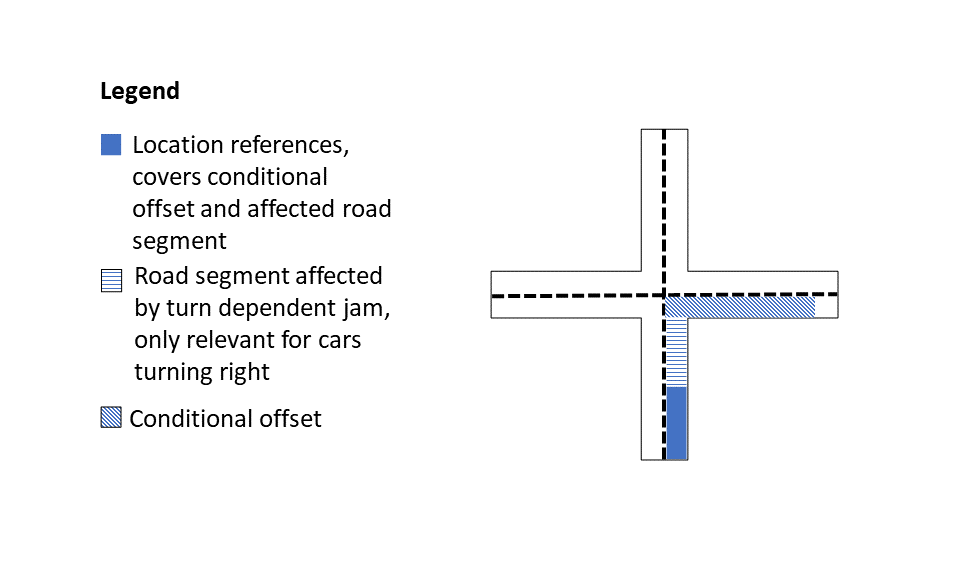 |
1<situationRecord [...]>2[...]3<situationRecordExtension>4 <alertCEventCode>115</alertCEventCode>5 <conditionalOffset>151</conditionalOffset>6</situationRecordExtension>7[...]8</situationRecord>
Validity period
| Field |
|
|---|---|
| Description | Specifies the validity of a
|
1<situationRecord [...]>2 [...]3 <validity>4 <validityStatus>active</validityStatus>5 <validityTimeSpecification>6 <overallStartTime>2022-10-10T08:00:00Z</overallStartTime>7 </validityTimeSpecification>8 </validity>9 [...]10</situationRecord>