How to architect a fitness tracker app with TomTom Maps
Introduction
Have you considered building a fitness app but don't know what's involved? This article helps you understand, at a high level, what goes into building out a fitness tracker app and how you can use TomTom’s APIs to do so quickly. Read on to get inspired.
You probably use — or are at least familiar with — fitness tracking apps like Strava and RunKeeper. But what would it take to build one?
In this article, you’ll learn about the front and back-end architecture for creating such an app. The architectural description is of design decisions and API-related options at a high level. You’ll also discover how TomTom APIs can help you create applications based on this architecture more quickly.
You’ll need to start with the essential requirements, like below.
Defining requirements
Before you can start to think about technical details,
such as your application’s overall architecture,
you need to know what your application should include.
This process is a requirements analysis, defining
what you should and shouldn’t have.
The chances are high that the requirement’s scope
is too large at first, so you’ll want to use a framework
such as “MoSCoW” to classify the criteria:
- Must: These are features that you want to have
in any release of your application.
They’re already part of the minimal viable product (MVP)
that you want to ship. - Should: These are features that should be in your
application release.
They don’t necessarily need to be a part of the MVP,
but they should come soon. - Could: These are features that you could choose
to include later.
Quite often, the decision to implement them depends
on user adoption and demand.
First, you should establish a user base,
then determine what you need to keep those users
and grow your base.
Maybe the “could” features come in handy later
for user retention and expansion. - Won’t: These are features that you intentionally
don’t pursue.
They might be too complex or conflict with the other
“must” or “should” feature categories.
Sketching the architecture
When you’ve defined all requirements, it’s time
to get technical.
Depending on your application’s needs, the map
may be the central component or just another control
that comes in handy.
In any case, it makes sense to divide the application
into the following parts:
- Frontend (user-facing apps, such as mobile apps
or a web application usually delivered as a
single-page application) - Backend (the API the user-facing apps use)
- Data storage and third-party services
(the secret ingredient your backend data operates on)
This separation is one of the basic tenets
of architecting modern mobile applications.
Testing and debugging become easier and more manageable,
and multiple apps can use the same data source.
You can swap out, improve, or scale the data storage
as you need.
It’s crucial to note the proper data storage
technology selection.
It could be that you should use multiple database
technologies.
Quite often, contents such as classical user data
(for example, a user’s profile) are well-structured
and might be best represented in classical SQL.
Examples include MySQL or PostgreSQL.
Then, you need to consider a user’s activity,
which varies in structure, depending on the activity type.
For such data structures, NoSQL is best suited.
One possible implementation is MongoDB.
Finally, you can collect time-series information
such as tracking information in a distributed
column-oriented data storage facility.
There are many options to choose from,
including Apache Cassandra.
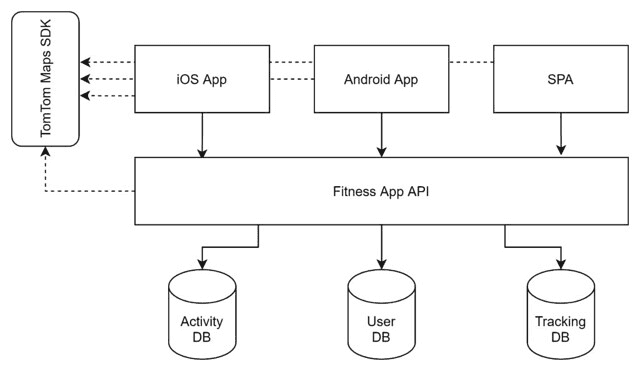
Since the API layer uses storage exclusively,
you can also start with a single technology
then refine it as you go.
Choosing an approach that you can scale
is critical.
If you look closely at the architecture diagram,
you’ll see that the backend also communicates
with the TomTom Maps SDK.
This setup is because some features like route planning
might be helpful to abstract from the fitness
application’s API.
Building what users want
Users of modern fitness tracking apps expect more than
just a boring list of time and distance traveled.
At a minimum, they hope to see a map showing
their current location and where they have been.
It should show running, walking, and cycling routes.
And it should provide the ability to plan fitness routes.
Once you have correctly stored the necessary
geolocation coordinates, you can make maps showing
these locations using the TomTom Maps SDK.
And, these maps will work in native applications
on Android, iOS, and web apps.
With TomTom Maps SDK, you can show stats about
the portion of the route that a user has completed
so far.
You can display a user’s tracks with custom markers
and colors that indicate which trails they followed
with their bicycle, where they’ve been running,
and where they walked.
You can also enable users to find routes to follow
when they are already out biking, running, or walking.
They can take a recommended course or choose any
other path depending on personal preferences,
which is especially helpful for cycling.
You can architect an even richer experience
for your app users.
You can create a fitness dashboard that users load
onto their desktop or laptop.
On the dashboard, users perform actions like overlay
and compare multiple workout routes on the same map
to understand how their fitness habits have changed
over time.
You can also use TomTom Maps SDK to enhance a user’s
ability to plan routes.
By enabling users to add waypoints to a map, they can
thoughtfully plan a path to ensure they hit their
fitness goals.
For example, a runner may want to ensure their run
is a minimum of five kilometers long and routes
through at least one park.
Using TomTom Maps APIs, you can show the user this
app-calculated information in real-time as they add
new waypoints, so they’ll know when they’re ready
to finalize the route.
Then, when the route is complete, you can overlay
the entire course on the map and even color-code
route segments to represent elevation changes.
You can build route sharing into your app, too.
When your users find a particularly challenging
or scenic route, they can share it with friends
to join in next time or with others in your app’s
community seeking a new running route.
Additionally, you can use the TomTom Maps API to
support features like multi-day cycling routes,
with waypoints for each night’s accommodation.
Users can derive the pathways between these waypoints
automatically.
And, with real-time updates, the app provides the
estimated altitude and the start and end times.
This information gives the user a good idea of how
challenging the route will be.
Adding features to enhance user experience
Using TomTom’s APIs on the server-side,
you can architect your application’s minimum
functionality to provide more than users think
they want.
For example, you can use the Search API to
automatically look up landmarks or other points
of interest along a user’s route.
You can also use the APIs to help automatically
generate friendly workout descriptions, like
“Tuesday run past Baker’s Ice Cream Shop and
through Central Park.”
There’s also the possibility of offering
AI-guided recommendations.
After all, these tips might be a great selling
point for your application.
You can derive recommendations from workout
patterns or use AI to find and present new
suggestions based on those patterns.
Summary
Architecting a fitness application is complex.
You need to consider many factors, like your app’s
competition, what your users want from a fitness
application, ease of use, and accuracy.
Using the TomTom Maps SDK, you can get a head start
and focus on the aspects that make your application
unique.
Don’t waste time cobbling together second-tier map
controls without backend APIs in your application.
Give your project a rocket boost by integrating
the TomTom Maps SDK for mobile or web into your
user-facing apps.
Sign up today and check out what the TomTom Maps SDK
can do for you and your application.
To learn more, check out our tutorial
Fitness Mapping with the Strava API and TomTom Maps.
Happy mapping!