Integrator Guide
Purpose
This guide provides a blueprint for integrating TomTom Hazard Warnings into client applications, such as navigation devices. It assumes that the integrator can access hazard messages through either the B2B or B2C delivery platform. Secure access to the delivery platform is described in the corresponding technical documentation. Unless explicitly stated otherwise, the recommendations in this guide apply to both B2B and B2C delivery mechanisms for hazard warning messages.
TomTom Hazard Warnings Service
TomTom Hazard Warnings is a low-latency warning service for end-user devices and customer backends. The warnings published by the service are safety-related and inform end-users of potentially dangerous traffic, road, and weather conditions. The hazard warnings help drivers anticipate the journey ahead. Based on multiple sources like active community input, sensor-derived observations, GPS probe data and other third-party services, the warnings can be displayed through in-vehicle navigation devices or transmitted to advanced driver assistance systems (ADAS). This enables the latter to adjust speed or adapt functionality as necessary.
Hazard Message
Hazard messages represent real-world hazardous events, also referred to as situations, on the road network. A single real-world hazard event may be represented by one or more hazard messages.
Hazard messages are dynamic and follow a lifecycle driven by creation, updates, cancellation, and expiration. Clients should use these lifecycle attributes to determine whether a hazard is still active, should be refreshed, or can be removed.
Each hazard message has:
- a unique identifier
- a version number
- an expiration time
The first occurrence of a hazard starts with version 1. Each subsequent update increments the version by 1. Hazards are actively cancelled by the service when they are resolved.
Lifecycle Concepts
Creation
A new hazard message is published with a unique identifier, an initial version of 1, and an expiration time.
Updates
As long as a hazard situation remains active, the service publishes updates whenever relevant attributes change. If the hazard remains active but its content does not change, the service may still publish an update to extend the expiration time and prevent the message from silently expiring.
In both cases, the message identifier remains the same, while the version number is incremented.
Cancellation
When a hazard situation is resolved, the service publishes a cancellation message. Clients should interpret this as an explicit instruction to remove the hazard immediately.
Expiration
Each hazard message includes an expiration time. This provides a default cleanup mechanism for consuming clients: if no newer update arrives before the expiration time, the client can safely remove the hazard from its local state.
Client Handling Recommendations
Clients should implement the following logic to handle the hazard lifecycle robustly:
- Process each hazard message as soon as it is received.
- Replace or refresh the stored hazard when an update for the same situation arrives.
- Extend the validity of a hazard whenever a new expiration time is received.
- Remove a hazard immediately when a cancellation message arrives.
- As a fallback, automatically remove a hazard if neither an update nor a cancellation is received before the expiration time.
Severity
The severity of a hazard describes how critical the hazard is in terms of danger.
Confidence
The confidence level of a hazard indicates how certain the system is that the reported hazardous condition is actually present.
Location Handling
Hazard warnings are location-based events. A warning may represent:
- a point
- a linear stretch on the road network
- an area
The service supports different location reference formats to represent these location types.
Geo Coordinate
Each create or update message provides a basic geo coordinate in the WGS84 coordinate system. If no additional location information is present, this single coordinate defines the location of the hazard.
If a more detailed location representation is available (for example, OpenLR or a geo coordinate sequence), the single geo coordinate serves as a simple and fast reference point for localization.
Geo Coordinate Sequence
A message can contain a geo coordinate sequence representing either a linear location or an area location. The sequence consists of WGS84 coordinates.
- For a linear location, the coordinate sequence defines a simplified path in the road network. The coordinates are ordered from start to end. Between two consecutive coordinates, the shortest path along the road network is assumed.
- For an area location, the
areaflag is set totruein the data model. In this case, the coordinate sequence defines a polygon. The coordinates are provided in order, and the last coordinate must connect back to the first to form a closed area.
Area locations provided by the service are simple, closed polygons.
OSM Way IDs
A message can contain a list of OSM way IDs. In case the application uses an OSM-based map, the OSM way ID can be used as map reference. Since the map used in the hazard service is updated frequently, the version on the device and within the service might diverge, which can lead to wrong or missing references.
If the map on the device is not updated frequently, we recommend using OpenLR as the referencing mechanism.
OpenLR
OpenLR is the map-agnostic way for applications to decode the location of a hazard event onto the client map. The following OpenLR location types are supported by the hazard warning system:
- Line Location
- Point Along Line
- Polygon
The OpenLR location type matches the location information provided in the geo coordinate sequence as described above.
For further reference, see the OpenLR Whitepaper.
Client Handling Recommendations
- If an OpenLR reference is available, it is recommended to use it to decode the event on the client map.
- Area locations should be treated as hazardous zones rather than as exact road-level positions.
- Area warnings that represent Slippery Road, Strong Wind, and Reduced Visibility situations are intended for the lower road network with FRC >= 2.
- Area warnings that represent Natural Disaster situations are intended for all road network classes.
Filtering
Attributes of the hazard warning messages, e.g., severity and confidence, can be used to restrict the hazard messages considered for different use cases. For example, in a driver information use case, hazards of all severity levels are displayed on the navigation app, whereas in an ADAS use case, the system only reacts to hazards with high severity and high confidence.
Lane Information
Lane information may be included in a warning message and can be used as additional context for the driver or for an autonomous vehicle. Lane information refers to either a specific drivable lane or to the shoulder lane.
Hazard Type Handling
Hazard messages represent hazardous situations on the road network. The application must decide when and how to react to a hazard provided by the service.
Depending on the use case, such as informing the driver in a conventional car or adjusting vehicle speed in an autonomous driving system, the integrator determines the appropriate response to a warning. Different hazard types contain different details that can provide additional support to the application.
The following sections provide recommendations for handling specific hazard types.
Traffic Hazards
Emergency Vehicle Approaching
Emergency Vehicle Approaching messages represent real-time emergency vehicles on the road.
These messages contain:
- geo coordinate
- bearing in degrees
- speed in km/h
This allows the client to infer the vehicle's direction of travel and estimate an appropriate time to warn the user.
Client Handling Recommendations
- The alert should be presented in-car when the approaching emergency vehicle is approximately 250–500 meters away.
- The alert should indicate the direction from which the emergency vehicle is approaching relative to the driver's own vehicle.
- The alert should be removed once the emergency vehicle has passed, and no later than 1 minute after it was first shown in-car.
- To avoid unnecessary distraction, only drivers who are directly affected by the emergency vehicle should be warned.
Jam Tail Warnings
Jam Tail Warnings identify potentially hazardous queue tails on motorways. The warning marks the upstream end of a traffic jam where TomTom detects a sudden drop in vehicle speed. It represents the point of abrupt braking rather than the full extent of the congestion. As a result, Jam Tail Warnings are not generated for every traffic jam. If traffic slows gradually, or if speed limits are already low and the speed differential is small, the event may not be triggered. This ensures the warning is focused on sudden braking situations that present an increased safety risk to approaching drivers.
Jam Tail Warning messages contain:
- OpenLR reference
- speed in km/h at the tail of the jam
These values allow the client to react appropriately to the jam tail warning.
Wrong-Way Driver
Wrong-Way Driver hazard messages represent any vehicle traveling against the direction of traffic.
The hazard warning message does not describe the exact moving location of the wrong-way driver, but the part of the road network where the driver is expected to be located.
Broken-Down Vehicle
Broken-Down Vehicle warnings represent a vehicle that has stopped unexpectedly in or next to moving traffic. Occupants may leave the vehicle, which increases the danger to surrounding road users.
This hazard type does not cover vehicles involved in an accident.
Accident
Accident warnings represent unattended traffic incidents that result in one or more stationary vehicles, potentially including casualties and debris on the road.
The location of the accident corresponds to the position of the stationary vehicle or vehicles involved in the incident.
Road Hazards
Roadworks
Roadworks are construction or maintenance sites on the roadway. They often involve reduced speed limits and lane changes.
Lane information may be included in the warning message and can be used as additional information for the driver.
Generic Hazards
Generic Hazards represent hazardous situations that do not fall into one of the specific hazard types described in this document.
Objects on Road
Objects on Road warnings represent any type of object on the roadway—such as animals, boxes, or people—that creates a dangerous situation for drivers.
Bad Road Condition
Bad Road Condition warnings represent potholes or large cracks in the road surface that may cause drivers to reduce speed.
Road-Weather Hazards
Road-Weather Hazards are events primarily caused by weather or natural phenomena. They include the following types: Slippery Road, Reduced Visibility and Strong Wind.
Road-Weather warnings are delivered:
- as linear events on FRC 0, FRC 1, and bridges
- as area events for all other road classes
In rare cases, e.g., slipperiness caused by an oil spill, linear Road-Weather Hazards may also be provided on lower functional road classes (FRC > 1).
Natural disasters, a subcategory of Road-Weather Hazards, include Wildfire, Earthquake, Flooding, Thunderstorm, and Volcano. Today they are delivered as area messages for all road classes.
Linear Hazards on FRC 0 and FRC 1
Road-Weather Hazards often represent large-area conditions. Because drivers may enter a hazardous situation from many different directions, warnings are issued at every junction, even when the weather condition itself does not change. While this maximizes safety, it can also lead to repeated warnings, especially on highways with frequent entry and exit ramps.
Example Situation
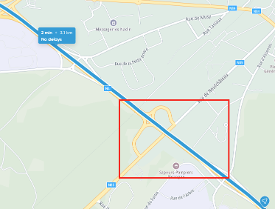
The following real-world example highlights how linear road-weather warnings are exposed. The chosen example is in Belgium — a typical situation with medium complexity. The following route highlights the area of interest and the below picture serves as visual representation.
The following picture showcases a slippery road weather situation on the highlighted route. Because drivers may enter a hazardous situation from any direction, events are issued at every junction, even when road-weather conditions do not change — i.e., the hazard type and the severity remain the same.
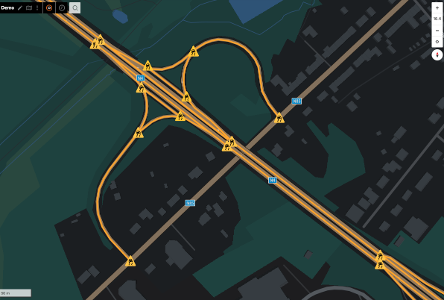
Even though the service may provide multiple events for the same real-world weather condition, from a UX perspective the user should ideally be warned only once unless the severity changes or the user re-enters the hazardous situation after a clear segment.
Client Handling Recommendations
To avoid over-alerting the user, the client should store the hazard type and severity of the active hazard situation. When receiving a consecutive event with the same hazard characteristics, the client may suppress additional notifications.
For exceptionally long road stretches affected by the same weather condition, it is recommended to define thresholds after which the warning is repeated.
Example Situation — Longer Route Use Case
Assume a driver is traveling on a planned route that includes multiple slippery-road sections over a total distance of 18 km. The reported slippery-road events are:
- km 1–3: severity medium
- km 4–8: severity major
- km 9–10: no event reported
- km 11–16: severity major
- km 17–18: severity medium
Applying the integration approach described above, the driver would receive the following warnings:
- A first warning at km 1, when the initial slippery-road event begins.
- A second warning at km 4, because the severity increases from medium to major.
- A third warning at km 11, because the road was clear beforehand and a new slippery-road event begins.
No additional warning is issued for the decrease in severity during the final 2 km, because the weather situation is improving rather than worsening.

Area Hazards on FRC >= 2
For the lower road network (FRC 2, FRC 3, ...), the service provides area messages for hazardous road-weather situations. Similar to linear road-weather events, multiple area messages may represent the same real-world weather phenomenon.
Because weather phenomena can span large geographic regions, the service cannot guarantee identical severity across all roads covered by an area. Therefore, area warnings should primarily be used to inform the user that they are driving into a hazardous region and should adapt their driving behavior accordingly.
Consecutive area events should be handled similarly to consecutive linear events. To avoid over-alerting the user, the client should store the hazard type and severity of the active area situation. When the client crosses the boundary between consecutive areas with the same hazard characteristics, no additional alert should be generated.
For exceptionally large areas affected by the same weather condition, it is recommended to define thresholds after which the warning may be repeated, even if the client remains within the broader hazardous region.
Users should be warned in time before entering the area. If a trip begins within a hazardous area, the user should be warned immediately after trip start.
Client Handling Recommendations
Area messages should be handled as hazard zones with an anticipatory warning strategy, rather than as strict geofence triggers. A pure geofence implementation would warn only when the driver crosses the boundary, which may be too late for some hazard scenarios. The client should instead warn slightly before the driver enters the hazardous area where possible.
Overlap of Linear and Area Warning
As described above, linear hazards are primarily delivered on motorways and highways (FRC 0 / FRC 1), whereas area hazards apply mainly to the minor road network. Therefore, a driver on a motorway or highway should generally not be warned about hazards represented only as area messages.
In special cases, such as bridges or slipperiness caused by an oil spill, linear events may also be provided on lower road classes. If linear and area events overlap, the linear event should take priority, because its location is more precise than that of the area event.