SQL Filtering
SQL Filtering
Every tool in the Traffic Analytics MCP Server requires a sql_queries parameter. This page explains how it works and how to write effective queries. For the motivation behind this approach, see What Makes This Different.
How It Works
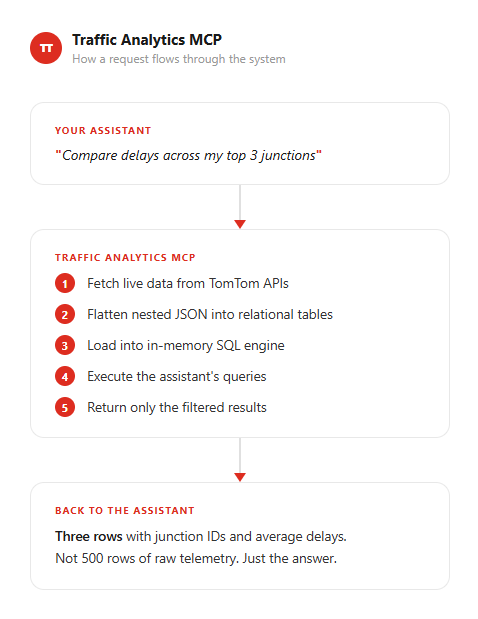
- Your AI assistant calls a tool with parameters and one or more SQL queries
- The server fetches data from TomTom APIs
- Nested JSON is flattened into relational tables (one table per data type)
- SQL queries run against those tables in an isolated, in-memory DuckDB instance
- Only the query results are returned to the assistant
Each request gets its own database instance. Queries are read-only and fully isolated.
The sql_queries Parameter
Every tool requires sql_queries as a JSON object. Each key is a label, and each value is a SQL query string:
1{2 "sql_queries": {3 "top_delays": "SELECT junction_id, approach_id, delay_sec FROM approaches ORDER BY delay_sec DESC LIMIT 5",4 "summary": "SELECT COUNT(*) as total_approaches, ROUND(AVG(delay_sec), 2) as avg_delay FROM approaches"5 }6}
Multiple named queries let the assistant extract different views of the same data in a single tool call without calling the API twice. Results are returned keyed by the query name:
1{2 "aggregated_data": {3 "top_delays": [4 {"junction_id": "abc-123", "approach_id": 1, "delay_sec": 142},5 {"junction_id": "abc-123", "approach_id": 3, "delay_sec": 98}6 ],7 "summary": [8 {"total_approaches": 12, "avg_delay": 45.33}9 ]10 }11}
SQL Dialect
The server uses DuckDB, which is PostgreSQL-compatible. Key functions you will use:
| Category | Functions |
|---|---|
| Aggregation | COUNT(*), AVG(), SUM(), MIN(), MAX(), COUNT(DISTINCT col) |
| Rounding | ROUND(value, decimals) |
| Date/Time | date_part('hour', time::TIMESTAMP), time::DATE, time::TIMESTAMP |
| String | ILIKE (case-insensitive), UPPER(), LOWER(), SUBSTRING(), LENGTH() |
| Type casting | CAST(value AS INT), value::DATE, value::TIMESTAMP |
| Null handling | NULLIF(value, 0), COALESCE(a, b), IS NULL, IS NOT NULL |
| Spatial | ST_Point(lon, lat), ST_GeomFromGeoJSON(json) (where geometry columns exist) |
Tables Per Tool
Quick reference of which tables are available for each tool. See Available Tools for full column details.
| Tool | Tables |
|---|---|
tomtom-area-analytics-stats | timed_data, tiled_data |
tomtom-junction-search | junctions, approaches, exits |
tomtom-junction-live-data | approaches, turn_ratios, stops_histogram, junction_metadata, approach_metadata, exit_metadata* |
tomtom-junction-archive | approaches, turn_ratios |
tomtom-route-search | routes |
tomtom-route-monitoring-details | route_info, segments |
tomtom-traffic-flow-segment | flow_segment |
tomtom-traffic-incidents | incidents |
* Available with specific parameter options (full view or includeGeometry).
Common SQL Patterns
Filtering
SELECT junction_id, name FROM junctions WHERE status = 'ACTIVE'SELECT * FROM incidents WHERE iconCategory = 'Accident' AND delay > 300
Aggregation
1SELECT junction_id, ROUND(AVG(delay_sec), 2) as avg_delay2FROM approaches3GROUP BY junction_id4ORDER BY avg_delay DESC
Top-N ranking
1SELECT approach_id, delay_sec, queue_length_meters2FROM approaches3ORDER BY delay_sec DESC4LIMIT 10
Date and time grouping
1SELECT date_part('hour', time::TIMESTAMP) as hour,2 ROUND(AVG(delay_sec), 2) as avg_delay3FROM approaches4GROUP BY hour5ORDER BY hour
JOINs across tables
1SELECT j.name, j.country_code, a.road_name, a.direction2FROM junctions j3JOIN approaches a ON j.junction_id = a.junction_id4WHERE a.road_name ILIKE '%highway%'
Calculated columns
1SELECT route_name, delay_time, travel_time,2 ROUND(delay_time * 100.0 / NULLIF(travel_time, 0), 1) as delay_percent3FROM routes4WHERE delay_time > 05ORDER BY delay_percent DESC
Multi-Entity Comparison
Several tools accept multiple IDs or bounding boxes in a single request:
- Junction tools: up to 20 junction IDs
- Route tools: up to 20 route IDs
- Traffic incidents: up to 10 named bounding boxes
When multiple entities are queried, their data is merged into the same tables with an identifier column (junction_id, route_id, or area_name). This enables cross-entity comparisons with standard SQL:
1-- Compare average delay across 5 junctions2SELECT junction_id, ROUND(AVG(delay_sec), 2) as avg_delay3FROM approaches4GROUP BY junction_id5ORDER BY avg_delay DESC67-- Compare incident counts across 3 city areas8SELECT area_name,9 COUNT(*) as total_incidents,10 SUM(CASE WHEN iconCategory = 'Accident' THEN 1 ELSE 0 END) as accidents11FROM incidents12GROUP BY area_name
Next Steps
- Available Tools: Full parameter and column reference for every tool
- Use Cases: See SQL filtering in action with real prompts