TomTom MCP Apps: When Your AI Agent Gets Eyes on the Map
)
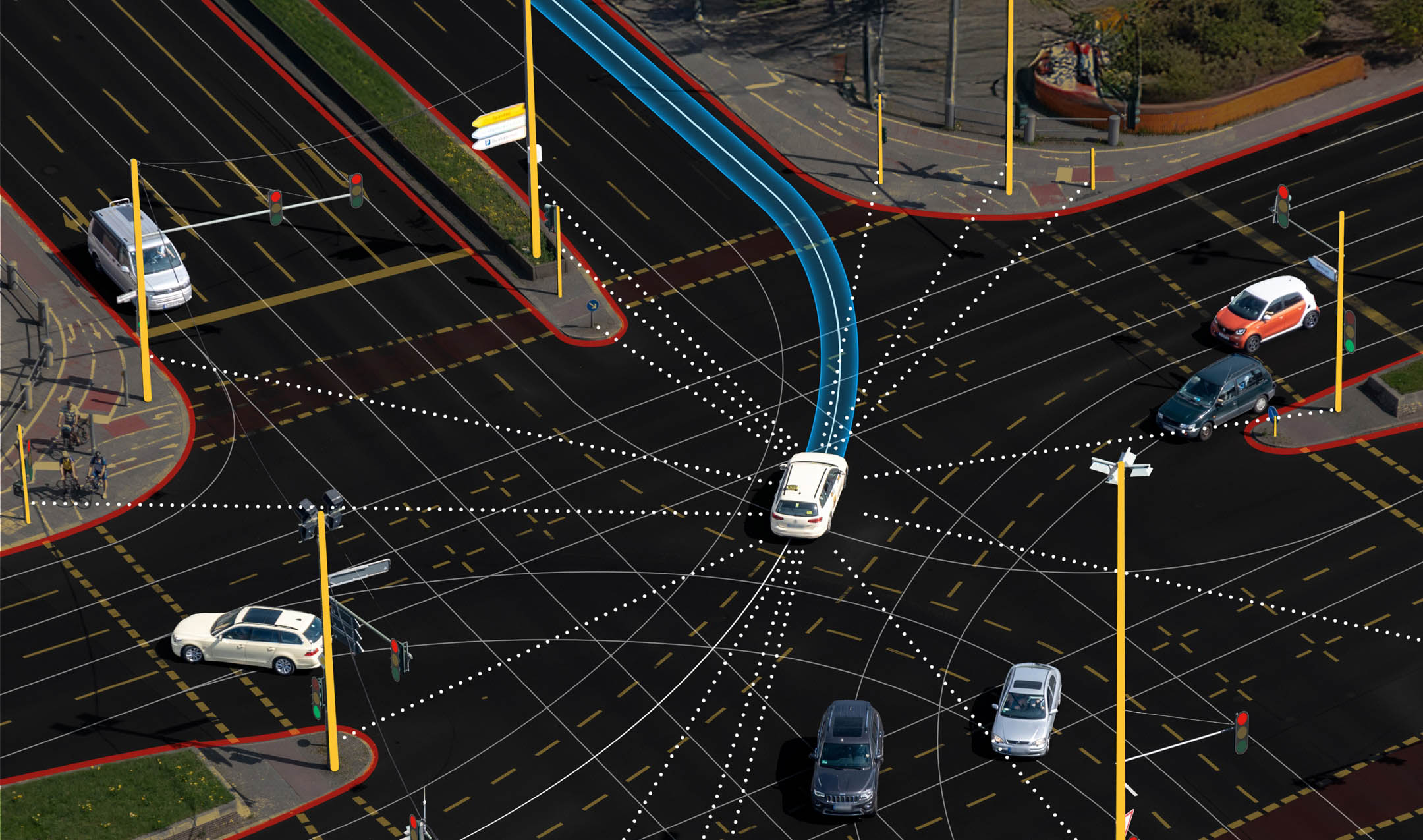
We launched the TomTom MCP Server to Public Preview in October to give AI agents direct access to our geospatial platform: search, routing, traffic, the works, all through the Model Context Protocol.
Introduction
Developers picked up MCP integration fast, and agents started doing genuinely useful things with location data. But there was a gap. Agents could fetch the data just fine. They could reason about it, summarize it, chain calls together. What they couldn't do was show it. And if you've ever tried to understand a complex route or a cluster of nearby POIs from a wall of JSON... you know that's a problem. Today we're closing that gap. TomTom MCP Apps bring interactive, visual map experiences directly into MCP-compatible clients, right inside the conversation.
What Are MCP Apps, Exactly?
MCP Apps are lightweight, self-contained web applications that render inline within MCP clients. Each one is a single-file HTML bundle built on the TomTom Maps SDK for JavaScript. No external dependencies at runtime. No setup required.
When an agent calls a TomTom tool (a POI search, a route calculation, a traffic check) the client can now display the results on an actual map. Pins for search results. Route lines with alternatives. Traffic incidents color-coded by severity. The kind of visual context that makes geospatial data click.
The key thing: the agent stays in control. It decides when to show a map and when to skip it. Not every intermediate step in a workflow needs a visualization, and we built for that.
Why do you need it?
If you’re already using the TomTom MCP Server, the newly added Apps capacity turn those tool calls into something your users can actually interact with. Instead of asking an LLM to describe long polylines or lists of POIs, you let it focus on reasoning while the app handles the map: search results as pins, routes as lines, incidents as overlays — all inline in the client.
That means less prompt gymnastics, fewer tokens spent on raw geospatial payloads, and a much better experience for anyone using your agent. They can visually verify routes, compare options, and explore results on the map, without you having to build or host a single UI yourself.
14 Apps Across the Full Geospatial Stack
We didn't ship one generic map widget. We built purpose-specific apps for every Orbis-based tool in the server:
Search Apps
Geocode: Convert addresses to coordinates with location markers on an interactive map
Reverse Geocode: Tap a point on the map and see the resolved address
Fuzzy Search: Mixed results (addresses, POIs, and geographies) displayed with categorized markers
POI Search: Category-based point-of-interest search with detailed popups for name, category, and address
Nearby Search: Find POIs near a location with distance-aware visualization
Area Search (new): Search within a geographic boundary with results plotted inside the area
Search Along Route (new): Find POIs along a planned route corridor without detouring from the path
Routing Apps
Route Planner: Visualize routes with alternatives, traffic-aware coloring, and turn-by-turn guidance
Waypoint Routing: Multi-stop routes with numbered waypoints and leg summaries
Reachable Range: Isochrone polygons showing how far you can travel given time or energy constraints
EV Routing (new): Electric vehicle routing with charging stop visualization based on battery constraints
Traffic Apps
Traffic Incidents: Incidents plotted on the map with severity-based color coding and detail popups
Map Apps
Dynamic Map: A general-purpose interactive map that combines markers, routes, polygons, and traffic layers
The Token Problem (and How We Solved It)
Here's a practical challenge with geospatial APIs: they return a lot of data. A single routing response can include tens of thousands of coordinate points. A search response comes packed with classifications, opening hours, data source references, bounding boxes. Useful stuff, but not what an LLM needs to reason about your query.
Sending all of that to the model burns tokens on data it'll never use.
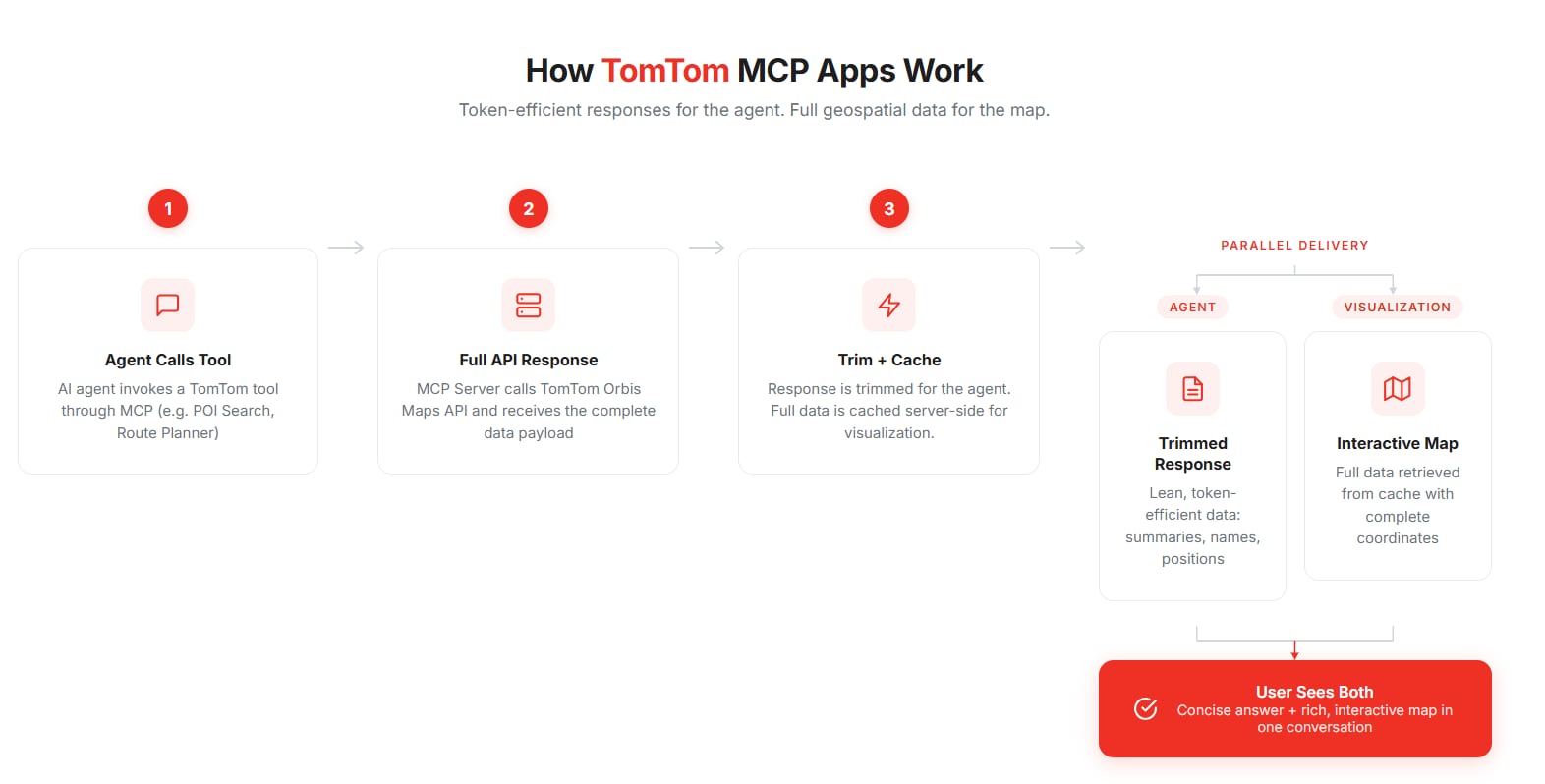
We introduced intelligent response trimming that strips responses down to what the agent actually needs (route summaries, names, positions, addresses, contact info) while preserving the full dataset for the visualization layer.
The architecture works like this: when a tool is called, the server fetches the complete response from TomTom's API, trims a copy for the agent, and caches the full version server-side with a unique ID. The agent gets a lean, token-efficient response. The MCP App retrieves the full data separately to render the map with all its coordinate-rich detail.
Agents never pay the token cost of polyline arrays or geometry blobs. The map still gets everything it needs. Everyone wins.
Every tool now accepts a response_detail parameter. Set it to "compact" (the default) for trimmed responses, or "full" when you need the complete API payload.
show_ui: Maps When You Want Them
Not every tool call needs a visual. If an agent is chaining operations (searching for a restaurant, finding a route to it, checking traffic along the way) you probably only want the map at the end.
The show_ui parameter gives the agent that control. Set it to true and the client renders the interactive map. Set it to false and you get data only, no visualization, minimal overhead. Simple, but it matters a lot for multi-step workflows and token-sensitive contexts.
New Tools in the Box
This release isn't just about visualization. We also added four new geospatial tools:
EV Routing: Plan routes optimized for electric vehicles, utilizing TomTom’s Long-distance EV Routing API. with charging stop placement based on battery constraints and charger availability.
Area Search: Search within a defined geographic boundary. Think "find everything inside this neighborhood."
EV Search: Dedicated search for EV charging stations with filtering by connector type, power level, and real-time availability.
Search Along Route: Find POIs along a planned route corridor (restaurants, fuel stops, rest areas) without sending you off course.
Each new tool comes with its own MCP App.
Getting Started
The TomTom MCP Server is on npm:
npx @tomtom-org/tomtom-mcpTo enable MCP Apps, configure with the Orbis Maps backend:
MAPS=tomtom-orbis-mapsApps are built automatically as part of the standard build. Any MCP client that supports the Apps spec will render the interactive UIs out of the box. Full details are in the README on GitHub.
What's Next
MCP Apps change how agents work with location data. Instead of just retrieving it, they can present it: visually, interactively, in context. We're expanding the app ecosystem, continuing to optimize token efficiency, and exploring new ways to make geospatial intelligence more accessible through AI workflows.
The TomTom MCP Server is open source under the Apache 2.0 license. We'd genuinely like to hear how you're using it — share feedback, report issues, or contribute on GitHub.
For more information, refer to TomTom MCP.
Build with maps. Build different.