Introducing Agent Toolkit in TomTom Maps SDK for JavaScript
)
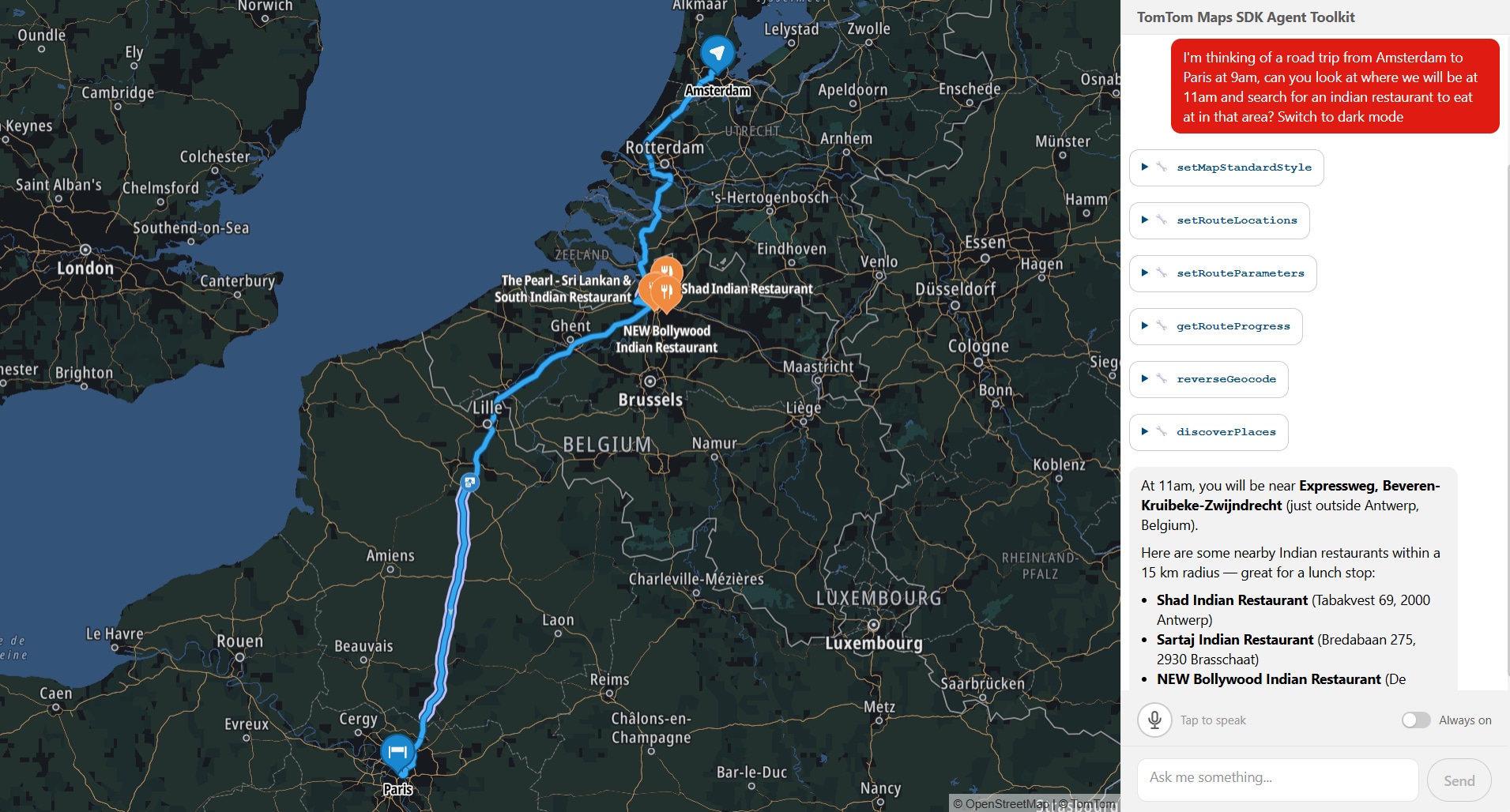
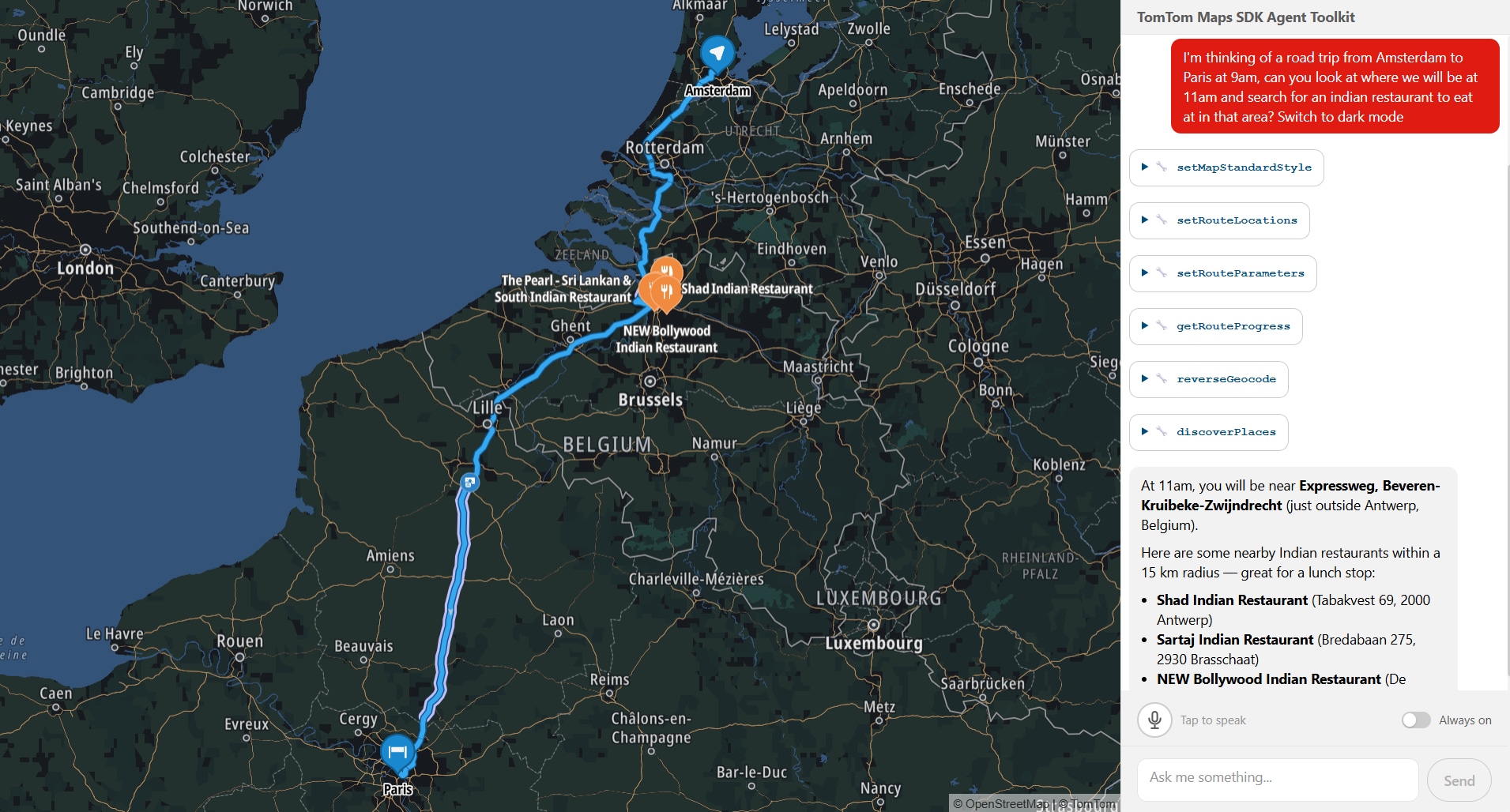
Your map just learned to listen. From natural language, to geocoding, searching, routing, and rendering — no orchestration code required. We are introducing the Agent Toolkit in TomTom Maps SDK for JavaScript: the missing layer between natural language and a live, responsive map.
Someone types "Show me Italian restaurants I can reach within 15 minutes of the Colosseum, then route me to one" into a chat box. Behind the scenes, a chain of tool calls fires: geocode the Colosseum, calculate a 15-minute reachable area, search for Italian restaurants within that area, display them on the map, pick a result, calculate a route, and render it. The map pans, a reachable-area polygon appears, markers drop in, a route line draws itself. One message, zero orchestration code. All running locally in your browser, right next to your map. This is not a concept demo. This is what you can build with the Agent Toolkit today. It’s an early release, we’re putting it in developers' hands now because we want to build with you, not just for you.
The glue layer problem
Our Maps SDK for JavaScript covers a lot of ground: place search, routing with traffic, reachable range calculations, incident overlays, camera animations, to name a few. Each piece works fine alone. But the moment you wire them together to handle a single natural-language request, the complexity multiplies fast.
You need to figure out what the user meant. Then pick which services to call, and in what order (you have to geocode before you can route). You need to pass results between steps so step five can use what step two returned. And at every stage, the map needs to stay in sync with what just happened.
If you have ever built this kind of glue layer, you know it is a significant piece of work. We knew it too, because we had to build it ourselves. That is what led us to package it up.
What we built
Meet our Agent Toolkit, delivered as a plugin for our Maps SDK: @tomtom-org/maps-sdk-plugin-agent-toolkit. It brings conversational AI to your map: an agent layer that runs client-side, right alongside your existing SDK setup. Sitting between your chat interface and the TomTom Maps SDK, it handles the full chain from user message to live map update.
It's headless by design, no chat UI included. You bring your own interface, your own design system, your own framework. The plugin handles the agent loop and map orchestration; how the conversation looks is entirely up to you.
It ships with 53 geospatial tools. The expected ones are there: geocoding, reverse geocoding, place search, routing with waypoints, traffic flow and incident overlays, map styling, camera control. But some of the less obvious ones are what we find most interesting:
Search along a route corridor to find fuel stops or restaurants without leaving your path
Reachable range polygons showing how far you can drive in 30 minutes or on your remaining EV charge
Traffic area analytics that give you congestion data by zone, not just a layer toggle
A direct MapLibre code execution tool (experimental), so the agent can write and run custom rendering logic when nothing in the built-in set fits
Every result hits the map in real time. Searches land as markers you can click for details. Routes draw as lines with traffic highlights. The conversation doesn't just return text. It updates a live map your users can pan, zoom, and explore.
Keeping it lean
53 tools is a lot of context for a language model to process at once. So before each turn, a lightweight LLM call (we call it the intent classifier) looks at the user's message and picks only the tools that are actually relevant. If someone asks "zoom in," the model gets the camera tools and nothing else. Token budgets are real, and this keeps things lean and accurate.

Conversations that remember
Every tool reads from and writes to a shared state layer. Full GeoJSON, coordinates, route geometry, it all lives in state. The model only ever sees compact summaries: names, addresses, distances, counts. This keeps the context window clean and token usage flat. A search returning 15 results sends 15 one-line summaries to the model, not 15 full GeoJSON features. The map gets the full data for rendering. The model gets what it needs to reason.
This makes multi-step conversations work naturally. When a user says "route me to the second one from that search," a recall tool looks up exactly what the search found three messages ago. Real coordinates pulled from state, not hallucinated, not re-queried.
Getting started
Here is the basic setup:import { createMapAgent } from '@tomtom-org/maps-sdk-plugin-agent-toolkit';
import { openai } from '@ai-sdk/openai';
const agent = createMapAgent(map, { model: openai('gpt-4o') });
const result = await agent.stream({ messages });
for await (const chunk of result.textStream) { /* pipe to your chat UI */ }You pass your existing TomTomMap instance and a model. The plugin registers the tools, wires the intent classifier, sets up the state layer, and gives you a streaming agent. Everything runs client-side and works with any Vercel AI SDK-compatible model.
The plugin is built on top of and compatible with the Vercel AI SDK, so it drops into whatever UI you're already building. Use it with the existing AI SDK UI hooks, or just plain vanilla JavaScript, the streaming interface is the same. Our example app uses @assistant-ui/react, but that's a choice, not a requirement.
Making it yours
We did not build this to be a black box. The whole point is that it becomes your agent.
The tool registry is fully open. The example app ships with a getCustomLocation tool that reads saved places. It gets the same treatment as every built-in: the classifier picks up the tool, state is shared, conversation context carries over. Add a tool for your fleet API, your EV charger network, or your booking system and it works the same way. Don't need traffic analytics? Set it to false and it's gone. Have your own geocoder? Swap ours out.
The classifier is yours to shape too. Point it at a cheaper model to keep classification costs low, write your own selection logic entirely, or turn it off and let the full tool set through every turn. An onClassify hook lets you observe what gets selected, so you can tune as you go.
You can append domain rules to the system prompt ("prefer metric units," "prioritize EV-friendly routes") without replacing the base instructions that teach the agent how to use the tools.
And if you want to go deeper: the tools, state layer, system prompt, and classifier are all exported individually. Skip createMapAgent, wire the pieces into your own agent loop, and take full control.
What comes next
Conversational maps are new territory for us, and honestly, for the industry. The plugin ships the tools and the orchestration, but we think the interesting part is what developers build on top of it. What does a map that understands natural language enable that a traditional map interface does not? We do not have all the answers yet, and that is what makes this exciting.
We are genuinely curious what you will build with it, and what you think we should build next. Come tell us over on our Github.
For more information, refer to: